Traditional story maps are great for seeing the big picture, but individual cards usually stop at a five-word title on a digital sticky note.
When an engineer, designer, or AI coding agent goes to build that feature, a short title is not enough.
Everyone ends up hunting across tickets, pull requests, test suites, and chat threads just to piece together the full context.
In Auto Story Map 0.7.1, we solved that gap by introducing a rich, structured Story Detail view directly inside your repository and local map UI.
Our Detailed Stories
There’s no reason not to be able to see all the context for a story in one place without having to spend your entire life in Jira.
Why Story Cards Need Real Context
When your story map lives inside your codebase, every card can act as a single source of truth instead of a hollow placeholder.
- Better Input for AI Agents: When a coding agent like Claude Code or Cursor picks up a task, it does not have to guess at intent or acceptance criteria. All the context it needs to write and verify code lives right inside the story record.
- Zero Tool-Hopping for Teams: Product managers, UX designers, and stakeholders can inspect any card on the map and immediately understand what is being built, why it matters, and whether it is ready to ship.
What’s Inside the Story Detail View
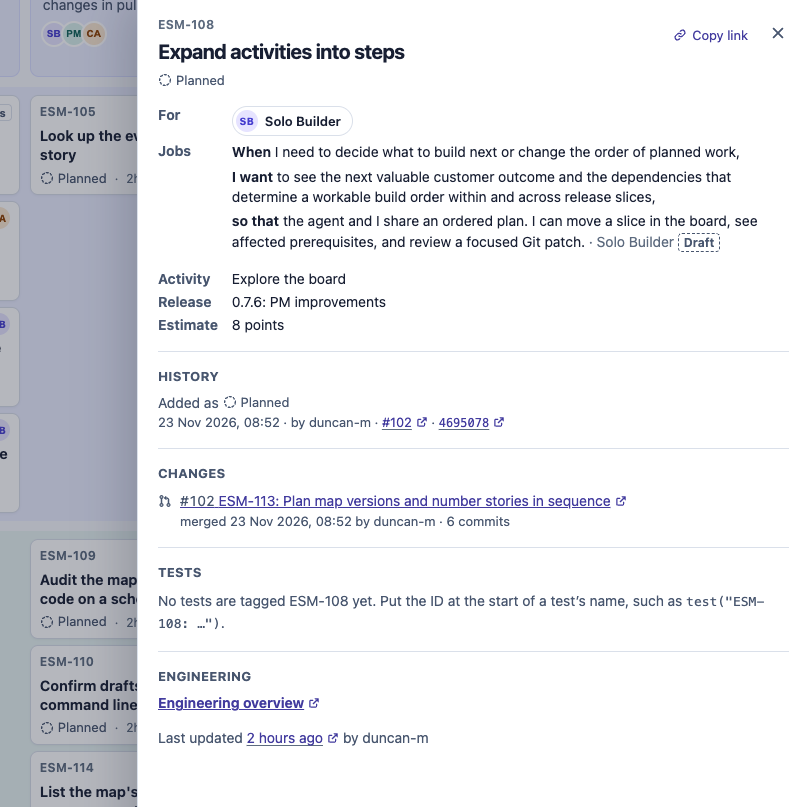
Clicking into any story on your map now surfaces eight structured fields that connect product intent directly to engineering execution:
- Job Story: Frames the feature around situation, motivation, and expected outcome (“When…, I want to…, so I can…”), keeping the team focused on user intent rather than rigid implementation details.
- Activity: Ties the story directly back to its parent workflow step on the map backbone so you never lose sight of where it fits in the broader journey.
- Release: Identifies which vertical release slice the story belongs to, making delivery priorities and scope cuts obvious at a glance.
- Estimates: Surfaces effort and sizing expectations right alongside scope so teams can balance workloads and spot oversized cards early.
- History: Captures a chronological trail of how the story has evolved, preserving context on why scope shifted or decisions changed.
- Changes: Summarises concrete updates made to the story or implementation across recent iterations and pull requests.
- Tests: Lists verification criteria and test coverage, making it clear how humans and agents prove the feature works as intended.
- Engineering Links: Connects the product view directly to the codebase with links to pull requests, commits, branches, and technical specs.
Built for Fast Reviews and Agentic Workflows
Maintaining this level of detail used to mean endless manual updates in heavy project management tools. Because Auto Story Map stores everything as structured data in your repo, your workflow stays lightweight:
- Draft with intent: Start a new card with a clear Job Story, Activity, and target Release slice.
- Let agents update the technical fields: As coding agents open pull requests and write tests, they can update Estimates, Changes, Tests, and Engineering Links automatically.
- Review in one place: Open the local story map during sprint planning or PR reviews to inspect the full lifecycle of any feature without leaving your app.
Getting Started
Update to 0.7.1 to start using the expanded Story Detail view in your project:
npm install github:duncan-m/auto-story-mapOpen any card on your map to explore the new fields, or point your coding agent at your story map data file to begin populating Job Stories, test coverage, and engineering links automatically.