Look at the top of almost any backlog, and you’ll see the exact same phrase repeated dozens of times: “As a user, I want to…”
But who is “the user”?
If you, or your agent, builds for a faceless user, you will end up with features that may not work for your user. Too simple, too complex etc.
That discipline has become even more urgent in the age of AI-assisted development. That is why we dedicated the 0.7.2 to 0.7.4 release cycle of Auto Story Map to making structured personas a first-class citizen right inside your codebase.
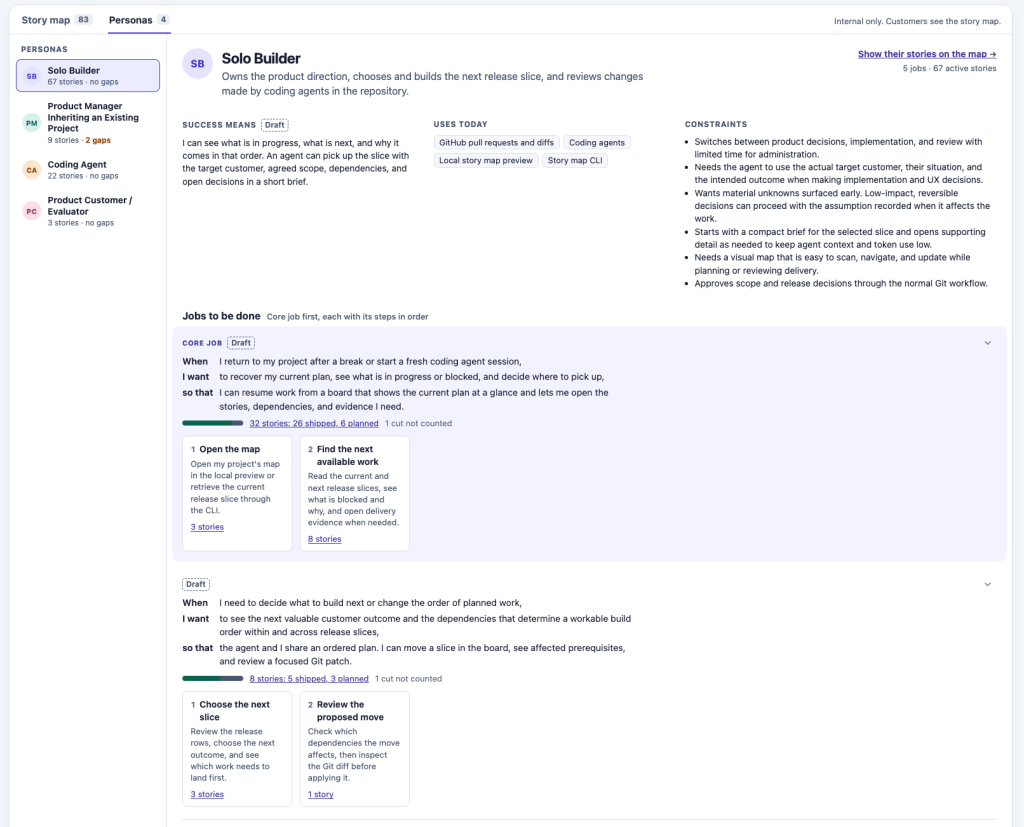
Our structure persona v1
As Silicon Valley Product Group (SVPG) and any UI designer worth their salt has long argued, saying your product is for everyone is a form of self-delusion. The real value of a persona is forcing hard prioritisation choices about which specific user(s) you are serving first.
What is a persona?
A persona is a concrete, research-backed archetype representing a distinct group of users who share similar behaviors, goals, and challenges when interacting with your product. Rather than relying on vague assumptions about an average customer, a persona grounds product decisions in real human context so everyone on the team builds with the same person in mind.
A practical product persona typically captures four core dimensions:
- Role and Context: Who the person is, their working environment, and what triggers them to reach for your product.
- Core Goals: The specific outcomes they are trying to achieve and what success looks like from their perspective.
- Primary Frustrations: The bottlenecks, manual workarounds, and pain points holding them back today.
- Technical Comfort and Constraints: Their familiarity with similar tools, time pressures, and operational limits.
Why Personas Matter Even More When Code Is Cheap
Across recent product leadership discussions, one theme keeps surfacing: speed without user context does not create value.
- Avoiding SVPG’s “AI Productivity Paradox”: In his July 2026 essay “The AI Productivity Paradox,” SVPG’s Marty Cagan highlighted a pattern hitting engineering orgs everywhere: teams are using AI to generate and ship features dramatically faster, yet business and customer outcomes remain flat. Follow-up SVPG analysis on “Experimentation, AI and the Product Model” (October 2026) noted that while synthetic users are increasingly used as quick pre-test filters, enduring product wins still depend on understanding what happens “inside the person you’re trying to serve.”
- The ProductTank Consensus (When Code Is Cheap, Context Wins): Recent ProductTank sessions (from “When Code Is Cheap, What Becomes Valuable?” to “Agents and Product Work”) and Mind the Product’s The Product Experience podcast (including Samsung VP of Design Federico Casalegno’s October 2026 discussion on synthetic data versus real lived experience) point to the same conclusion: when anyone can generate UI in minutes, validated human insight and clear user archetypes become the primary moat.
When an AI agent like Claude Code or Cursor picks up a task from your backlog, it will happily build whatever you ask:
- Without a concrete persona attached to your user journey, the agent defaults to generic UI and standard patterns.
- With a structured persona living right next to your story map, both humans and agents know whose friction they are eliminating before a single line of code is written.
Cutting the Busywork: Lightweight Personas Maintained by Agents
Historically, maintaining personas and user journeys was a heavy, manual chore. Teams spent weeks building polished slide decks, sprawling whiteboards, or dense wiki pages that went out of date the moment the next sprint started.
With AI agents embedded in your development workflow, that overhead disappears:
- Automated Upkeep: Because personas live as lightweight, structured files right next to your code, coding agents can draft updates, link new features to user goals, and keep journey slices aligned as pull requests ship.
- Instant Answers for Product and UX: Designers and product managers no longer have to dig through disconnected folders or static presentations to verify who they are building for.
- At-a-Glance Clarity for Stakeholders: Anyone opening the story map can immediately see which persona a workflow serves, what pain points are being solved, and how live delivery progress connects back to real user needs.
What’s New in Auto Story Map 0.7.2 – 0.7.4
Over the last three minor releases, we rebuilt how Auto Story Map models and surfaces the people walking your user journey:
0.7.2: Laying the Persona Groundwork
Before introducing the template, we updated the underlying architecture to treat personas as structured data rather than loose text labels.
- Expanded Persona Schema: Decoupled journey actors from plain strings so teams can store rich, reusable user profiles directly in the repository.
- Agent Context Routing: Improved how Auto Story Map exposes user profile metadata to coding agents when slicing releases or updating feature statuses.
- [Fixes / Polish]: (Insert specific 0.7.2 bug fixes or type improvements here)
0.7.3: Introducing the Persona Template
In 0.7.3, we shipped our standardized Persona Template, designed to be checked directly into version control alongside your story map data.
- Opinionated, Lean Structure: Captures the essentials without persona bloat: role context, core goals, primary frustrations, and technical comfort level.
- Slice-Level Linking: Connect specific horizontal journey steps and vertical release slices directly to the primary persona they serve.
- [Tooling / CLI]: (Insert specific 0.7.3 initialization command or config options here)
0.7.4: Bringing Personas into the Story Map UI
Our latest release surfaces the Persona Template directly inside the local story map interface.
- Interactive Persona Cards: View each persona’s goals and pain points right above the user journey backbone, keeping real user context visible during planning and PR reviews.
- [Workflow Polish]: (Insert specific 0.7.4 UI or agent-workflow refinements here)
- [Fixes / Performance]: (Insert specific 0.7.4 fixes here)
Getting Started with the Persona Template
Update to 0.7.4 and attach a structured persona to your living story map:
npm install github:duncan-m/auto-story-map- Create your primary persona using the new Persona Template in your repo (start with 1 to 3 high-priority archetypes rather than trying to cover everyone).
- Link the persona to your journey slices so each release clearly states who benefits and why.
- Point your coding agent at the map so every pull request checks new UI and flows against real user frustrations rather than generic assumptions.